Completing a Health Check
Run a guided Health Check that captures a full set of vitals and risk scores in one encounter, then print a branded Health Check Report to hand over or refer on.
A guided assessment that captures a full set of vitals and risk scores in one encounter, ending in a Health Check Report you can hand to the patient.
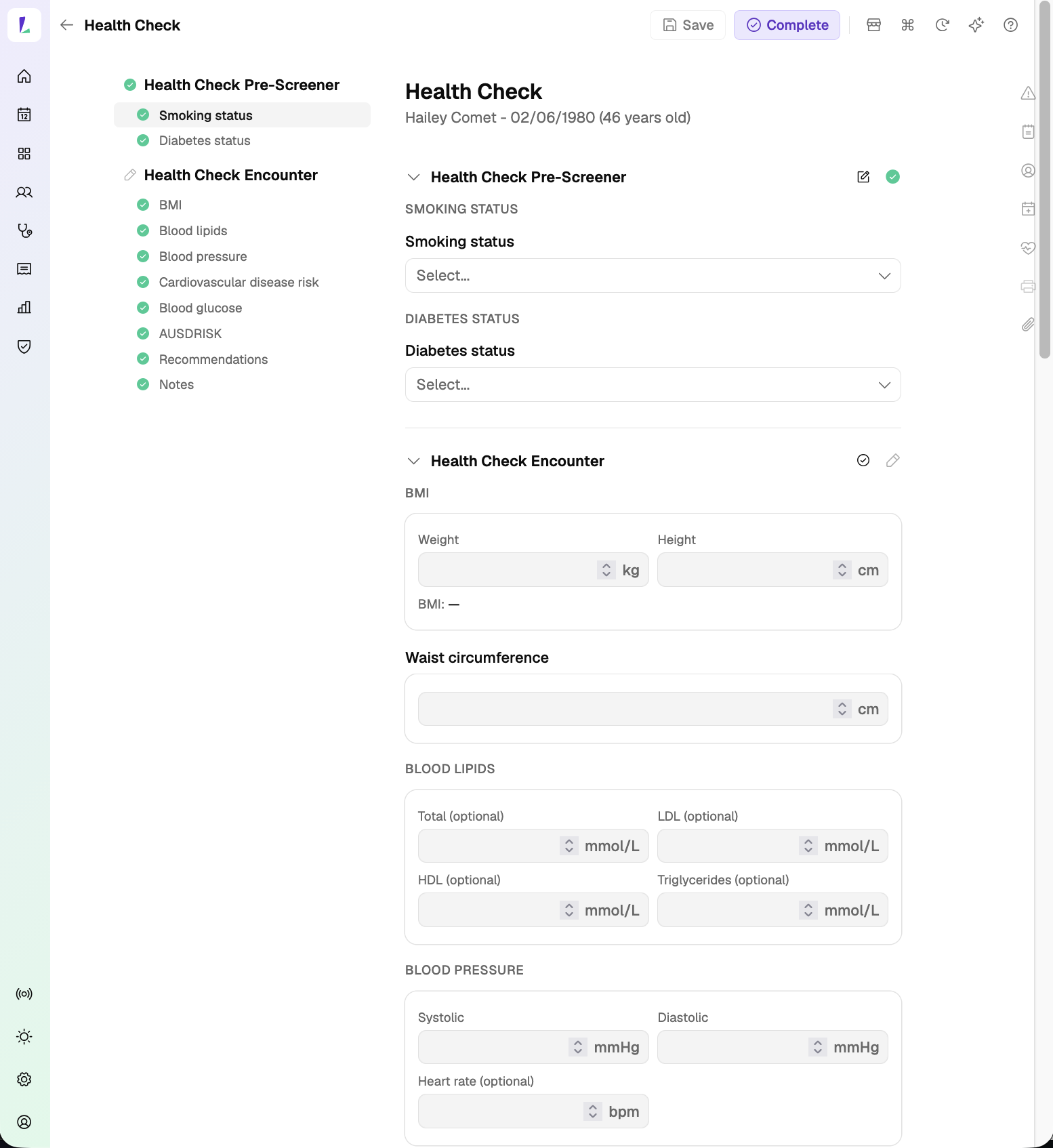
The Health Check steps you through the assessment section by section.
Before you start: make sure your measuring devices are maintained and calibrated so readings are accurate.
How to complete a Health Check
All fields are optional to complete.
- Record smoking and diabetes status. In the pre-screener, record the patient's smoking status and whether they've been diagnosed with diabetes.
- Record BMI. Enter the patient's weight and height. BMI is calculated automatically from the two.
- Enter blood lipids and blood pressure. Record total, LDL, HDL, and triglycerides, then systolic, diastolic, and pulse.
- Record cardiovascular disease risk. Use the link to open the Australian CVD risk calculator, estimate the patient's 5-year risk, then record the result back in Light.
- Enter blood glucose. Record fasting blood glucose, blood glucose, and HbA1c.
- Enter the AUSDRISK score. Record the Australian Type 2 Diabetes Risk Assessment (AUSDRISK) total score.
- Add recommendations and notes. Enter your pharmacy's recommendations – these print on the Health Check Report. Add any other notes, then choose Complete to finish the encounter.
Editing after you've completed
To change a value after the encounter is complete, tap the edit (pencil) icon on the section you want to change and update the values. Choose Complete again afterwards – the vitals only update against the patient's profile once the encounter is completed.
How to produce the Health Check Report
You must Complete the encounter before you can produce the Health Check Report. Once it's complete, there are two ways to print:
- From the encounter – tap the printer icon.
- From the service page – open the three-dot menu next to the encounter and choose Print Health Check Report.
The report prints on your pharmacy letterhead as a single summary of all results – BMI, blood lipids, blood pressure, blood glucose, cardiovascular disease risk, AUSDRISK score, diabetes status, and your recommendations – with a signature and date line. Hand it to the patient, or they can share it with their GP or another healthcare professional as a referral.
Bright idea
Save your digital signature on your Light user – go to Settings›Team, open your user, then Signature – and it can be stamped on the report at print time, so there's no wet-ink step. See Adding your digital signature.
A Health Check Report summarises measurements and risk results recorded during a pharmacy health check. It is not a diagnosis; if any result is outside the healthy range, advise the patient to discuss it with their pharmacist or GP.