Recording a Minor Skin Conditions consultation
Record a NSW Minor Skin Conditions consultation guided by the NSW Pharmacist Practice Standards – set the clinical impression, work through it as a wizard or a single scroll, and record the outcome.
A Minor Skin Conditions consultation – which may also be referred to as dermatology – is a structured encounter for a minor skin presentation, delivered under your expanded scope of practice. Light guides it with prompts and reference material based on the clinical impression you set, surfaces the eligibility and screening criteria to consider, and assembles the record from what you record.
The consult is available in NSW, and its prompts and reference material are guided by the NSW Pharmacist Practice Standards.
Before you start
Minor Skin Conditions consults are part of the expanded scope of practice, for pharmacists who have completed the approved training and who meet the requirements that apply to the service in NSW. These are set by the practice standards and the class authority for NSW, not by Light – confirm the current requirements that apply to you before you deliver the service. See How the platform uses clinical protocols and standards.
Recording this consult requires your individual healthcare provider identifier (HPI-I). You can add it against your own profile at Settings›Team – open your profile and add your HPII on the Identifiers page.
Starting the service
There are three ways to start:
- From Services – go to Services, select Add, choose the Minor Skin Conditions service, then select an existing customer or add a new one.
- From the customer – open the customer's record, select Services, then choose Add service and select the Minor Skin Conditions service.
- From a booking – if the patient booked in for the consult, start the encounter from their booking.
Setting the clinical impression
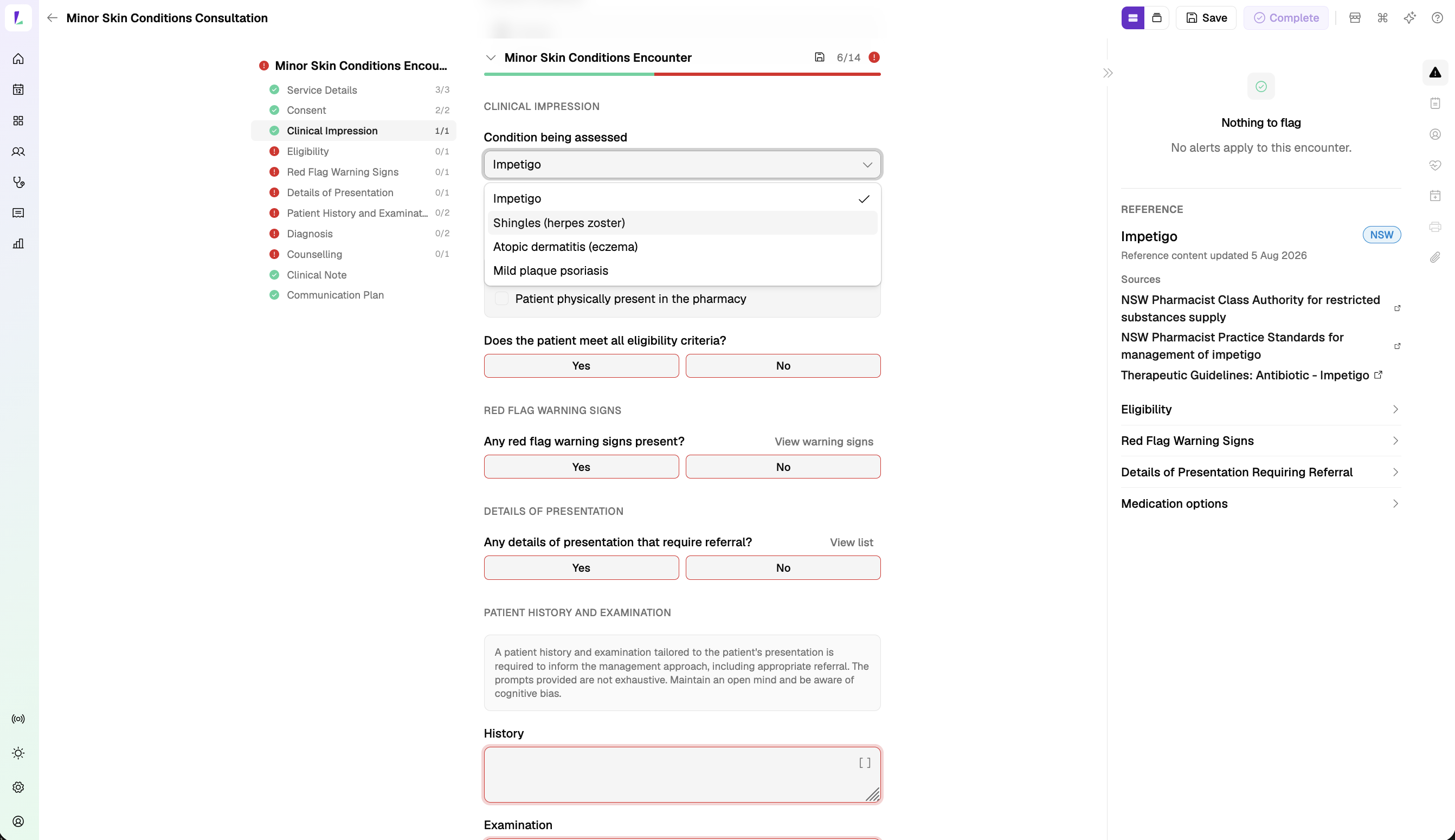
Start by recording the clinical impression – the condition you're assessing. Choose from:
- Eczema (atopic dermatitis)
- Impetigo
- Psoriasis (mild plaque)
- Shingles (herpes zoster)
The eligibility criteria, red flag warning signs, details of presentation that require referral, and medicine options that follow all reflect the protocol for the condition you choose.
Choosing how you work through it
Like the UTI consult, you choose how you move through the encounter. In the encounter header, the Form display control switches between:
- Continuous form – one scrolling page, with a section rail down the left to jump between sections.
- Step-by-step form – a guided wizard that takes the sections a screen at a time.
Pick whichever suits you – the record is the same either way.

The reference panel
The Reference panel sits beside the encounter with the clinical reference for the condition you set. It carries a jurisdiction badge (NSW), a Last reviewed date, and a Sources list linking to the governing standards and guidelines – for example, the NSW Pharmacist Class Authority, the NSW Pharmacist Practice Standards, and the Therapeutic Guidelines. You can keep it open as you work – it's the guidance behind the prompts.
The reference reflects its sources as at a point in time, not a live feed. For where the content comes from and what stays your responsibility, see How the platform uses clinical protocols and standards.
Working through the consult
The consult moves from consent, through eligibility and clinical screening, to diagnosis, counselling, and the outcome. Its sections are: Service Details, Consent, Clinical Impression, Eligibility, Red Flag Warning Signs, Details of Presentation, Patient History and Examination, Diagnosis, Counselling, Clinical Note, and Communication Plan.
Record eligibility against the Eligibility criteria for the condition – mark whether the patient meets all criteria. Record whether any red flag warning signs are present and whether any details of presentation require referral; each has a View list link to the criteria to consider.
If a screening step flags a red flag warning sign, or a detail of presentation that may require referral, the consult sets out a referral pathway you can follow. Light records the outcome and guides you; the clinical judgement stays yours – see How the platform uses clinical protocols and standards.
If there's more you'd like to capture than the structured fields hold, add it to the Clinical Note, the Notes tool on the right, or as an attachment.
Completing the record
Complete the encounter to save the record. You can print the patient's summary to give the patient. Outputs print on your pharmacy letterhead and can carry your signature. See Completing an encounter.
Recording responsibility
This article explains how to record this encounter in Light. Practitioners remain responsible for delivering the service in accordance with applicable clinical, program and jurisdictional requirements and for maintaining a complete and auditable record. See Recording Encounters in Light and How the platform uses clinical protocols and standards.
Authorities, practice standards, and protocols can change at any time, without warning or notice to software vendors. The content in Light may not reflect the most recent version at the time you use it. Always confirm against the current published source before you rely on it.