Editing customer details
Update name, contact details, and identifiers on a customer record.
Inline edits
On the customer's profile, most contact fields can be edited in place:
- Mobile
- Date of birth
- Gender
- Address
Tap the field, change the value, and it saves when you leave the field.
The edit sheet
For a full edit — or to change fields that aren't inline-editable (identifiers, alternate contact methods) — tap Edit at the top of the profile. The edit sheet opens with every field editable in one form.
The same Edit Customer sheet is reachable without first navigating to the profile:
- Booking detail — tap Edit next to the patient or booker name.
- Service detail — tap Edit next to the customer name.
- Attendees list — open the row's actions menu and choose Edit.
- Customers list — open the row's actions menu and choose Edit.
Identifiers
Four identifiers can be stored on a customer:
- Medicare — card number and expiry. Required for PPA claims.
- IHI — Individual Healthcare Identifier. Fetched from Services Australia; usually populated automatically.
- DVA — Department of Veterans' Affairs file number.
- Concession card — card type, number, and expiry.
Concession cards
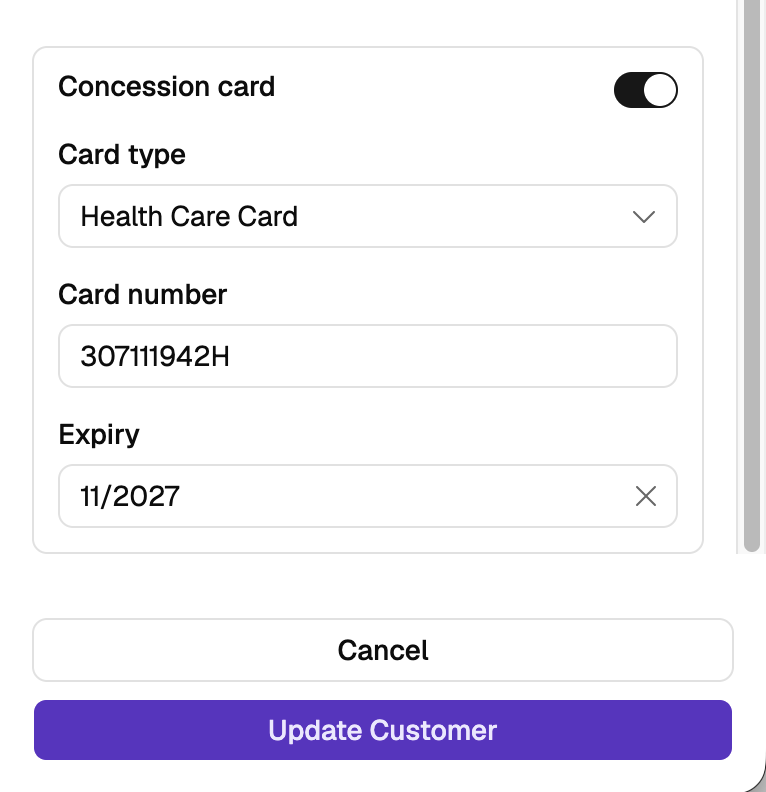
Record a patient's concession card so their entitlement is on file. It sits at the bottom of the edit sheet, below Medicare and DVA.
Turn on Concession card, choose the Card type — Health Care Card, Pensioner Concession Card, Commonwealth Seniors Health Card, or Safety Net Concession Card — then enter the Card number and Expiry.
Card numbers on the first three are nine digits followed by a letter, for example 123456789A. Safety Net numbers aren't checked against a format.
Turning the switch off removes the card from the record when you save.
The concession card isn't shown on the customer's profile — reopen the edit sheet to see or change it. It also prints on the Staged Supply agreement, under Concession card details. See Recording Staged Supply.
Changes to these fields are recorded on the Activity tab with who made the change and when. IHI revalidation and status changes are also logged automatically.
What editing doesn't do
- Doesn't merge records. If the customer has a duplicate record, editing one won't combine them. A merge flow isn't available yet — delete the duplicate after copying its bookings and files by hand.
- Doesn't update AIR. AIR holds its own record of the person; editing their Light record doesn't touch AIR. Identity corrections for AIR are done through Services Australia, not Light.